+ 48 694 141 549
  sales@sara-next.com
  Log in


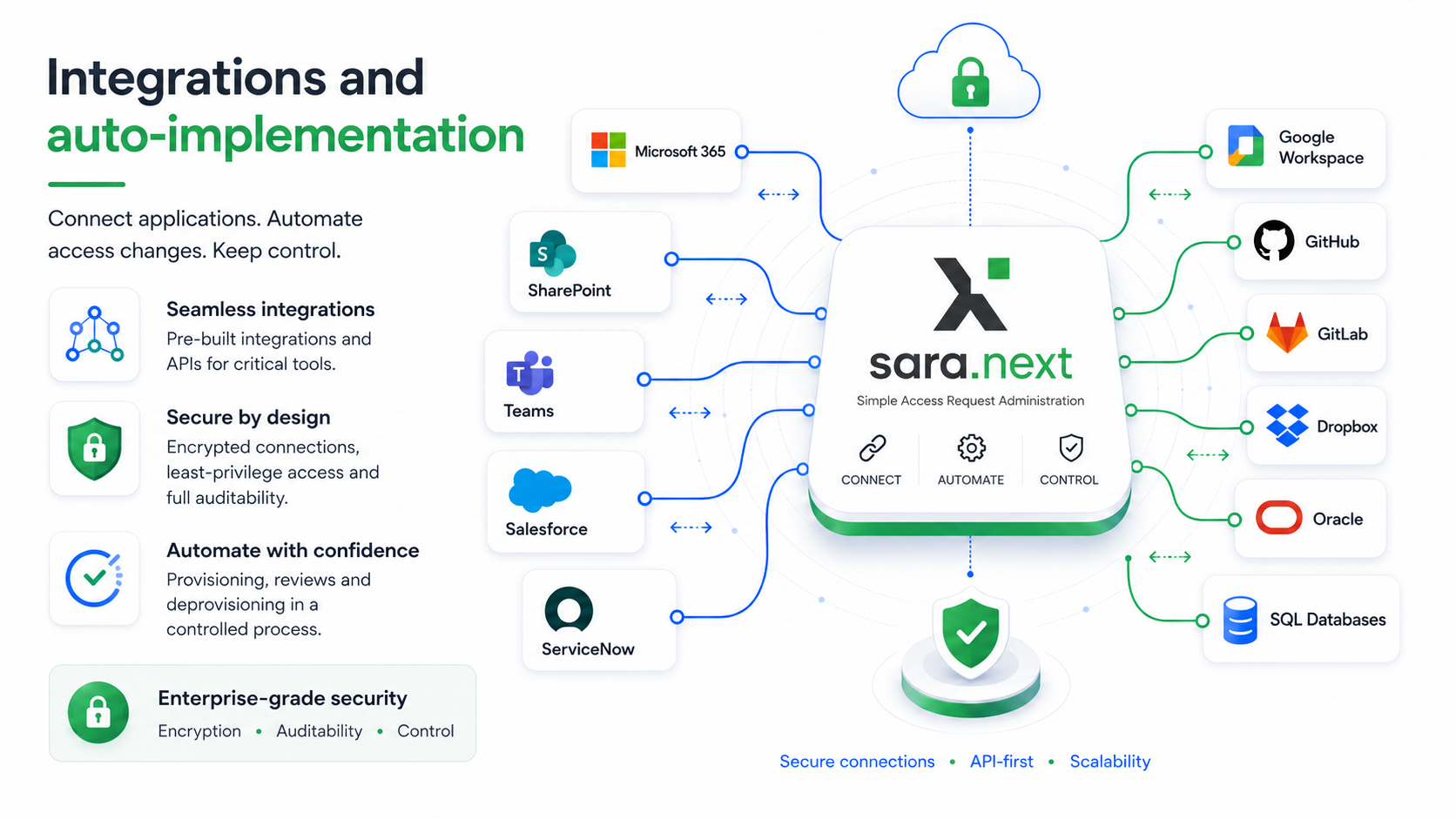
Integrations that turn access decisions into real actions
sara.next supports organizations in managing access not only at the level of requests, approvals, and reviews. Thanks to its integration mechanisms, the system can automatically pass approved changes to target applications, reducing administrators’ manual work and lowering the risk of errors.
Granting, modifying, swapping users, and revoking access can all be carried out in a controlled process – with a full audit trail, execution verification, and compliance with the principle of least privilege.
- Automation of access changes after approval.
- Integration via REST API, SQL, or a middleware adapter.
- Full audit trail for every decision and operation.
- Support for granting, changing, revoking, and reviewing access.
- Option to start with an import and gradually move to auto-implementation.
Why approving access alone is no longer enough
In many organizations, the access process ends with approving a request. But a business decision alone doesn’t mean access was actually granted, changed, or revoked in the target application. Between approval and execution there’s manual administrator work, the risk of delays and errors, and no clear confirmation that the state in the target system matches the decision made in the process.
sara.next closes this gap. The system can handle the entire access lifecycle – from request, through approval, to automatically executing the change and verifying it. This gives the organization greater control over who has access, to what, on what basis, and whether that access was actually implemented correctly.
Less manual work
Reduces administrators repetitive tasks tied to manually granting and revoking access.
Fewer errors
Automation lowers the risk of mistakes caused by manually re-entering decisions into multiple systems.
Greater control
Every change is linked to a request, a decision, an approver, and the implementation result.
Better auditability
The history of access, decisions, execution, and verification remains available as control material.
How auto-implementation works in sara.next
Auto-implementation is a mechanism that automatically executes an approved access change in the target system. Once the approval workflow is complete, sara.next runs the appropriate integration operation and then checks whether the change was carried out correctly.
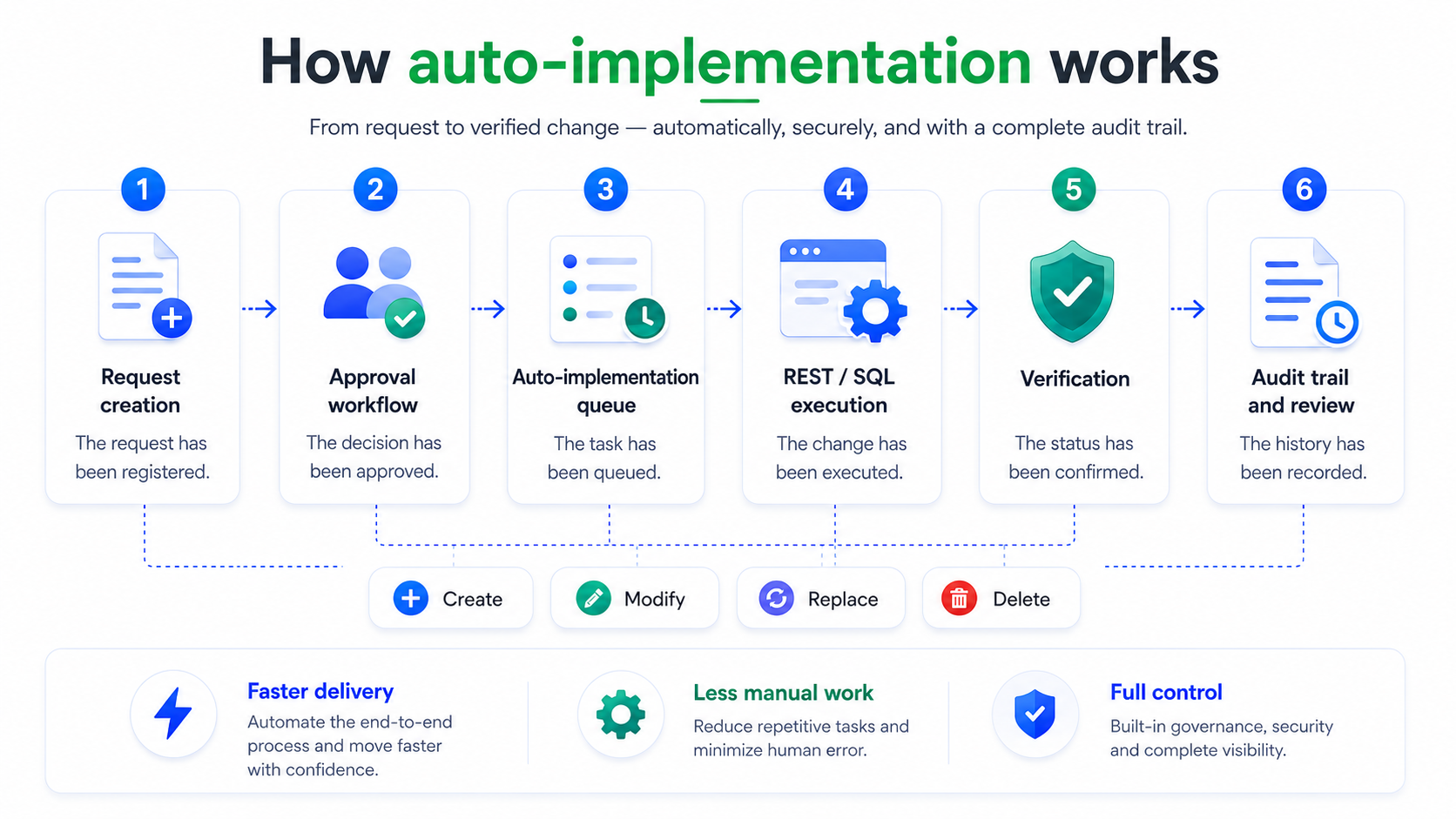
Workflow action plan:
Krok 1: Create a request
A user or an authorized person submits a request to grant, change, swap a user, or revoke access.
Krok 2: Approval workflow
The request goes through a configured approval process aligned with the requirements of the organization and the application owner.
Krok 3: Auto-implementation queue
After approval, the request enters the auto-implementation task queue.
Krok 4: Execution via REST API or SQL
sara.next executes the change in the target application through a configured REST or SQL connection, or an integration adapter.
Krok 5: Verification
The system checks whether the expected state was reached – e.g., whether the user was added to a group, given a role, or removed from access.
Krok 6: Audit trail and review
The operation result is saved in the history and can be used in reports, audits, and periodic access reviews.
Which access changes can auto-implementation handle?
sara.next can support the automatic execution of the most important access operations, provided the target application exposes a suitable technical interface. This lets the system handle both simple group assignments and more complex models of roles, permission sets, projects, teams, or resources.
Automatically adding a user to a group, role, project, team, workspace, permission set, or resource.
Changing the scope, level, dimension, or parameters of existing access.
Transferring access from one user to another – e.g., for a role change, a stand-in, or a reorganization.
Automatically revoking access, removing membership, a role, or an assignment in the target system.
Checking whether the state in the target application matches the decision made in sara.next.
Choose the right integration model for each application
Not every application has the same level of readiness for automation. That’s why sara.next can work in different integration models – from manual implementation and data import, through dictionary synchronization, all the way to full auto-implementation via REST API or SQL.
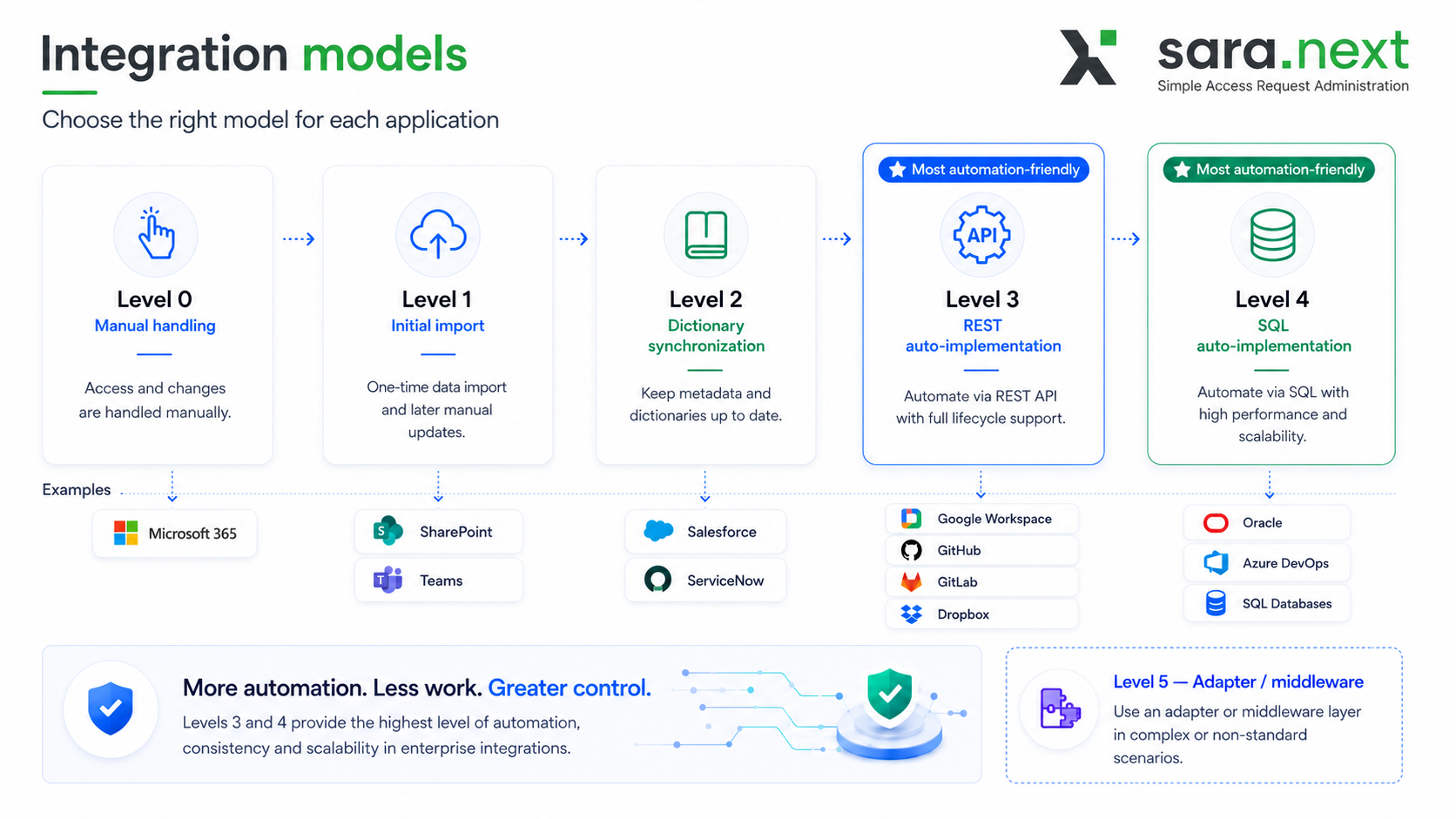
Level 0 - manual handling
For applications without a secure API or without the ability to change access automatically. sara.next runs the process, approvals, history, and reviews, while implementation is done manually.
Level 1 - initial import
For applications whose access state can be loaded into sara.next at the outset. A good first step toward bringing an application under IGA control.
Level 2 - dictionary synchronization
For applications and source systems that can supply reference data – e.g., lists of roles, companies, departments, locations, warehouses, projects, or cost centers.
Level 3 - REST auto-implementation
The most universal model for cloud applications and systems that expose an API. It lets you automatically execute access changes through official REST endpoints, Graph API, or SCIM.
Level 4 - SQL auto-implementation
A model for databases and applications where access can be safely managed through SQL, stored procedures, or controlled permission tables.
Level 5 - adapter / middleware
A model for more complex or non-standard systems. sara.next communicates with a REST adapter, and the adapter performs the actual operations in the target system.
Which systems can sara.next integrate with?
sara.next can integrate with applications and platforms that expose official interfaces for managing users, groups, roles, permission sets, teams, projects, or resources. The scope of integration always depends on the available API, the permission model, and the customer’s security policy.
Access can be managed through Microsoft 365 groups, security groups, Teams teams, or SharePoint resource permissions. This is one of the most natural areas for piloting auto-implementation.
sara.next can support processes for granting and revoking permissions based on permission sets and user assignments.
Integration can cover assigning roles to users and linking the access process to an existing ITSM environment.
You can manage access based on Google groups, which in turn control access to the organization’s resources and services.
sara.next can support access control for repositories, projects, developer teams, and DevOps spaces.
Dropbox Business and other collaboration tools
Access to shared spaces can be managed through groups, teams, or team folders, if the provider’s API allows it.
Oracle Fusion and enterprise systems
In enterprise-class systems, auto-implementation can cover application roles and user assignments, provided the system exposes a proper administrative API.
SQL databases and custom applications
For internal applications and databases, integration is possible through SQL or a dedicated REST adapter.
A natural first step: Microsoft 365, SharePoint, and Teams
In many organizations, Microsoft 365 is one of the most widely used work environments. Access to teams, groups, document libraries, and project spaces often has a direct impact on information security. At the same time, these are areas where access changes happen very frequently: when joining projects, changing teams, ending collaboration, or during periodic cleanups.
sara.next can help bring order to this process by moving access decisions into a controlled workflow and then carrying them out through integrations. As a result, access to teams, documents, and collaboration spaces no longer has to be managed purely manually or outside the audit process.
Access to project teams
Controlled adding and removing of users from Teams teams.
Access to SharePoint resources
Managing access to libraries, folders, and document spaces, especially through groups.
Time-limited access
Granting access for a set period and automatically triggering the revocation process.
Access reviews
Periodically confirming whether users should still have access to the specified resources.
Automation without losing control
Auto-implementation doesn’t mean skipping controls. Quite the opposite – in sara.next, automatically executing a change is preceded by a request and approval process, then complemented by verification and a history record. This lets the organization automate technical operations while retaining business, audit, and security control.
The same model can be applied to many applications, gradually expanding the scope of automation.
Post-execution verification
sara.next can check whether a user actually received or lost a given access.
Full audit trail
The system retains information about the request, the decision, the execution, the operation result, and the access history.
Controlled errors and exceptions
If automatic implementation can’t be carried out, the process can be routed to technical support or manual verification.
Principle of least privilege
Technical accounts and integrations should be granted only the scope of permissions necessary to perform specific operations.
Not every application should be automated right away
A credible approach to integration requires a technical and security assessment. If an application doesn’t expose an official administrative API, doesn’t allow checking the access state, or the vendor doesn’t support changes directly in the database, a better solution may be a manual model, data import, or an intermediary adapter.
List of situations:
- no official API for users, roles, or groups
- the API handles business data but not permissions
- no way to verify a completed change
- no test environment
- no stable user identifier
- the system requires additional approvals outside sara.next
- the vendor doesn't allow direct SQL changes
- the system has critical or privileged access requiring special control
In such cases, sara.next can still run the process and provide approvals, history, reports, and reviews, while the implementation itself can remain manual or be carried out through an adapter.
How to start an integration rollout?
The best approach is to start with applications that have high business value and are also technically friendly to integration. Typical pilot candidates are Microsoft 365, SharePoint, Teams, Salesforce, ServiceNow, GitHub, GitLab, or selected SQL databases.
Step 1: Select pilot applications
Identify 2-3 systems where automation will deliver quick results and is technically feasible.
Step 2: Analyze the permission model
Determine whether access is based on groups, roles, projects, permission sets, folders, resources, or permission tables.
Step 3: Confirm interfaces
Check whether the application exposes a REST API, SQL, SCIM, Graph API, or requires an adapter.
Step 4: Import the initial state
Load current access into sara.next and tidy up the dictionaries.
Step 5: Configure auto-implementation
Prepare scripts for creating, modifying, removing, and verifying.
Step 6: Testing and launching the pilot
Validate the process in a test environment, then a controlled production launch.
Step 7: Expand the scope
Once the pilot is confirmed, you can add further applications and additional operation types.
Find out which applications in your organization can be automated first
You don’t have to automate everything at once. sara.next lets you start with access inventory and reviews, then gradually move to integration, dictionary synchronization, and full auto-implementation in applications that are technically ready for it.
During the consultation, we’ll help determine which applications can be covered by auto-implementation, which require an adapter, and which should remain in a manual or review-only model.